討論區上說最簡單的題目:
308,316,895,898,10194,10206,10209,10300,10340,10469,10473,10499,10550,10565,10589,10673,10696,10783,10789,10812,10878,10903,10924,10929,10963,11059,11172,11185,10290,10608,10702
想解的:
http://acm.uva.es/p/v1/140.html
http://acm.uva.es/p/v101/10176.html
http://acm.uva.es/p/v110/11020.html
http://acm.uva.es/p/v100/10034.html
http://acm.uva.es/p/v110/11038.html
http://acm.uva.es/p/v103/10307.html
http://acm.uva.es/p/v110/11032.html
http://acm.uva.es/p/v110/11096.html
http://acm.uva.es/p/v100/10094.html
http://acm.uva.es/p/v100/10032.html
http://acm.uva.es/p/v110/11043.html
http://acm.uva.es/p/v110/11045.html
http://acm.uva.es/p/v110/11047.html
http://acm.uva.es/p/v9/944.html
http://acm.uva.es/p/v110/11007.html
ACM 討論區:
http://acm.uva.es/board/
以前的解題紀錄(現在搬到新網站,不能這樣看了):
http://acm.uva.es/problemset/usersnew.php?user=25917&mode=1
2008年2月15日 星期五

2008年2月9日 星期六
解決工作列小圖示自動載入問題
我遇到的問題在於右下角的工作列,也就是會顯示你目前開啟哪些程式的地方 ( 通常有音量、網路狀態… ),有些常駐程式開機以後就會自動載入以保護作業系統能正常運作(如防火牆、防毒軟體…)或是某些隨硬體附上的控制程式 ( 如音效卡、顯示卡… ),現在這台電腦距離上次重灌大概也有兩年了,偶爾開機以後工作列只出現一部分小圖示,其他則是消失不見,但程式仍有正常運作,從工作管理員裡面也可以看到,只是沒辦法再次開啟那些程式的GUI ( 如防火牆的控制介面或音效卡自己的音量調整 ),必須利用工作管理員將之強制關閉,重新啟動那個程式後,小圖示會再次出現,也能正常使用它的控制介面,大部分消失的都是防火牆 ( Outpost Free ) 和音效卡的控制程式 ( XFire 1723 ),後來防火牆換成 COMODO Firewall Pro 也有一樣的問題出現,本以為要重灌才能解決,看了參考資料後,稍微更改一些設定,目前開機一切正常,問題不再出現。
解決方法如下:
這個方法對我來說很有用,參考資料中還有列出其他的解決方案,如果這個方法行不通的話,可以參考那篇文章看看。
參考資料:
Systray icons missing
http://winhlp.com/node/16
解決方法如下:
我的電腦(或是點選 " 開始 " ) -> 網路上的芳鄰 ->
在左邊的 " 網路工作 " 中點選 " 隱藏已連接網路 UPnP 裝置的圖示 "
重新開機以後應該就能正常顯示
這個方法對我來說很有用,參考資料中還有列出其他的解決方案,如果這個方法行不通的話,可以參考那篇文章看看。
參考資料:
Systray icons missing
http://winhlp.com/node/16
2008年1月22日 星期二
解決 0x0000007E 錯誤 (開機出現藍底白字畫面)
首先可以參考微軟的兩篇疑難排解
疑難排解 Windows XP 的啟動問題
http://support.microsoft.com/kb/308041/
如何將 Windows XP 設定為在「初始狀態開機」狀態中啟動
http://support.microsoft.com/kb/310353/
而我的狀況是:
啟動 XP 就出現藍底白字畫面,顯示 0x0000007E error ,請移除新安裝的程式之類的鬼東西,但可成功進入安全模式。
比較奇怪的是,這顯示卡從一年半以前到現在用起來都好好的,最近也沒裝啥奇怪的軟體或更新驅動程式,問題竟然出在它身上,真讓我始料未及…會不會是微軟更新的錯呢??(顯示卡是Winfast PX7300 GT)
疑難排解 Windows XP 的啟動問題
http://support.microsoft.com/kb/308041/
如何將 Windows XP 設定為在「初始狀態開機」狀態中啟動
http://support.microsoft.com/kb/310353/
而我的狀況是:
啟動 XP 就出現藍底白字畫面,顯示 0x0000007E error ,請移除新安裝的程式之類的鬼東西,但可成功進入安全模式。
- 先拔除新安裝的硬碟 : 沒有用,不是硬碟衝到。
- 拆下記憶體清一清,換另一個插槽:還是沒用。
- 按照第二篇疑難排解調整系統設定公用程式:沒用,還是進不去。
比較奇怪的是,這顯示卡從一年半以前到現在用起來都好好的,最近也沒裝啥奇怪的軟體或更新驅動程式,問題竟然出在它身上,真讓我始料未及…會不會是微軟更新的錯呢??(顯示卡是Winfast PX7300 GT)
2007年12月28日 星期五
2007年12月16日 星期日
Using MinGW with SciTE On a USB Stick
OS: Windows XP
Required Space: Less than 70 MB
Packages:
1. SciTE ( http://scintilla.sourceforge.net/SciTEDownload.html )
2. MinGW packages ( http://sourceforge.net/projects/mingw/ )
Final Step - Start Programming
Reference:
Installing MinGW - manually
http://www.mingw.org/MinGWiki/index.php/Install%20MinGW
SciTE Documentation - properties file
http://scintilla.sourceforge.net/SciTEDoc.html
Required Space: Less than 70 MB
Packages:
1. SciTE ( http://scintilla.sourceforge.net/SciTEDownload.html )
2. MinGW packages ( http://sourceforge.net/projects/mingw/ )
- binutils
- gcc-core
- gcc-g++ ( optional in "MinGW GettingStart section" ?)
- mingw-runtime
- w32api
- mingw-32 make ( optional )
- mingw-utils ( optional )
- Create a directory for install (ex. MinGW )
- Extract All the MinGW packages into the directory (there is some strange instructions about " info/dir " in the Install MinGW page , but I ignore them , and still works fine )
- Extract " SciTE.properties " from the full download version to the directory which stores source codes ( this properties will only take effect per directory, please refer to the comment inside )
- append following two lines to the SciTE.properties
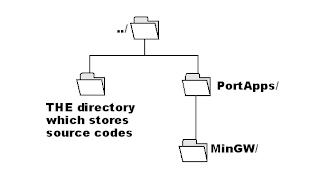
command.compile.*.c=../PortableApps/MinGw/bin/gcc -o $(FileName).exe $(FileName).c -std=c99" ../PortableApps/MinGw/ " is the directory where I install MinGW , as the graphic shown below,remember to change it according to your own condition
command.go.*.c=./$(FileName).exe

Final Step - Start Programming
- Use SciTE to open your source code , press Ctrl+F7 to compile (Or select it from Tools)
- Bang !! Now you can start programming on most computers :)
Reference:
Installing MinGW - manually
http://www.mingw.org/MinGWiki/index.php/Install%20MinGW
SciTE Documentation - properties file
http://scintilla.sourceforge.net/SciTEDoc.html
訂閱:
文章 (Atom)


